
Best Thermal Printer POS Machine for Shops & Restaurants
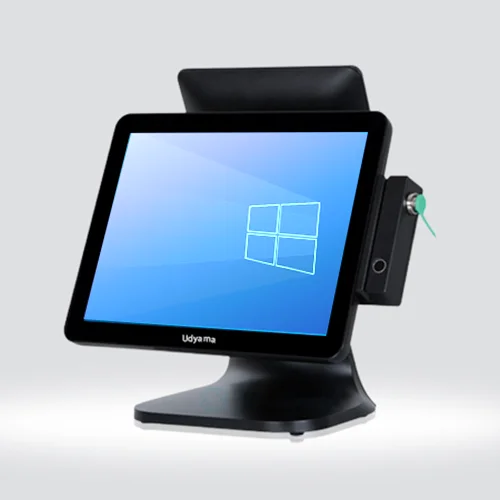
Running a shop or restaurant means handling bills quickly, keeping customers moving, and maintaining accurate sales records. A reliable best thermal printer POS machine can make these everyday tasks much easier. Instead of managing separate billing equipment, businesses can use a compact POS setup that combines billing software, a touchscreen interface, and fast thermal receipt printing.
For small retailers, grocery stores, cafés, restaurants, bakeries, and other businesses, choosing the right point of sale machine can improve the checkout experience while making daily billing more organized.
What Is a Thermal Printer POS Machine?
A POS machine with a thermal printer is a billing system designed to create and print receipts quickly. Thermal printers use heat-sensitive paper instead of traditional ink cartridges, making them convenient for regular billing operations.
Modern POS systems may also support features such as inventory management, barcode scanning, digital payments, customer management, and sales reporting. Depending on the business, you can choose a countertop POS or a portable Android-based device.
Why Choose a Top Quality POS Machine?
A top quality POS machine should do more than simply generate a bill. It should be easy to operate, reliable during busy hours, and capable of handling your daily billing requirements.
Some important benefits include:
- Faster billing and checkout
- Quick thermal receipt printing
- Easy touchscreen operation
- Better sales and inventory management
- Support for digital payment methods
- Compact and space-saving design
- Easy integration with other POS accessories
- Better organization of daily transactions
For businesses that serve many customers every day, these features can save valuable time at the billing counter.
Billing Machine for Shop: What Should You Look For?
When selecting a billing machine for shop, consider the type and size of your business. A small retail store may need a simple and compact system, while a supermarket or busy restaurant may require a more powerful POS setup.
Look for features such as:
Fast Printing: A good thermal printer should produce receipts quickly so customers do not have to wait.
Easy Billing: The interface should be simple enough for employees to learn and use without difficulty.
Inventory Management: For retail businesses, tracking products and stock levels can make daily operations easier.
Payment Support: Modern POS systems can work with cash, cards, UPI and other digital payment options depending on the software and hardware configuration.
Reliable Performance: The machine should be suitable for continuous use during busy business hours.
POS Machine Price: What Determines the Cost?
The POS machine price can vary significantly depending on the hardware, display size, operating system, printer type, connectivity, and software features.
A basic billing machine may be suitable for a small shop, while an Android POS machine with an integrated printer, barcode scanner, larger touchscreen, and advanced software can cost more.
Instead of choosing a machine only because it has a low price, compare:
- Printer quality and printing speed
- Screen and touch response
- Storage and processing performance
- Connectivity options
- Software compatibility
- Warranty and service support
- Availability of replacement parts
- Business-specific features
The right choice should offer a balance between price, functionality, and long-term usability.
Point of Sale Machine for Different Businesses
A point of sale machine can be useful across many types of businesses.
Retail Shops: Quickly create bills, manage products, and print customer receipts.
Grocery Stores: Combine POS billing with barcode scanning and inventory tracking.
Restaurants: Generate customer bills and connect the POS with restaurant billing workflows.
Cafés and Bakeries: Handle quick counter billing while keeping receipt printing fast.
Small Businesses: A compact system can save counter space while providing essential billing functions.
Android POS Machine with Printer: A Smart Choice
An Android POS machine with printer combines the flexibility of an Android interface with built-in or connected thermal printing. This type of system can be particularly useful for businesses that want a modern touchscreen billing experience without using a traditional desktop computer.
Depending on the model and software, an Android POS can support billing applications, product management, barcode scanning, digital payments, and reporting.
Some handheld Android POS devices also include an integrated printer, allowing staff to create and print receipts while moving around the store, restaurant, or service area.
Thermal Print Machines for Billing
Thermal print machines for billing are popular because they are designed for fast receipt printing and do not require ink cartridges or ribbons.
For businesses with frequent transactions, thermal printing can be a practical solution. Before buying one, check the supported paper size, printing speed, connectivity, paper availability, and compatibility with your billing software.
A printer that connects through USB, Bluetooth, Wi-Fi, or LAN can offer different advantages depending on your POS setup.
Compact Billing Machine for Small Shops
Counter space is important for small businesses. A compact billing machine can provide essential billing functionality without occupying too much space.
Compact POS machines are especially useful for:
- Small retail counters
- Convenience stores
- Cafés
- Bakeries
- Food counters
- Small restaurants
- Mobile billing requirements
A smaller footprint does not necessarily mean fewer features. Many modern compact systems can combine billing, receipt printing, payment support, and business management features in one setup.
Thermal Printer for Restaurant Billing
A thermal printer for restaurant billing can help restaurants print customer receipts quickly during busy service periods. Restaurants may also need POS systems that support table management, order handling, KOT printing, takeaway orders, and other restaurant-specific workflows.
For a restaurant, it is therefore important to consider the complete POS setup rather than selecting a printer alone. The printer should work smoothly with the restaurant’s billing software and other connected devices.
How to Select the Best Thermal Printer POS Machine?
Before making a purchase, ask yourself a few simple questions:
- What type of business do you operate?
A retail shop and restaurant may have different POS requirements. - How many bills do you generate daily?
High-volume businesses should prioritize reliable and fast printing. - Do you need a touchscreen?
Touch POS systems can provide a more modern and user-friendly billing experience. - Do you need portability?
Handheld Android POS devices can be useful when billing needs to happen away from a fixed counter. - Do you need inventory and reporting?
If yes, choose a POS system with suitable billing software rather than a basic printer alone. - What is your budget?
Compare the complete cost of hardware, software, accessories, and support before deciding.
