
Mini Thermal Printer and Portable Thermal Printer | A Smart Printing Solution for Businesses
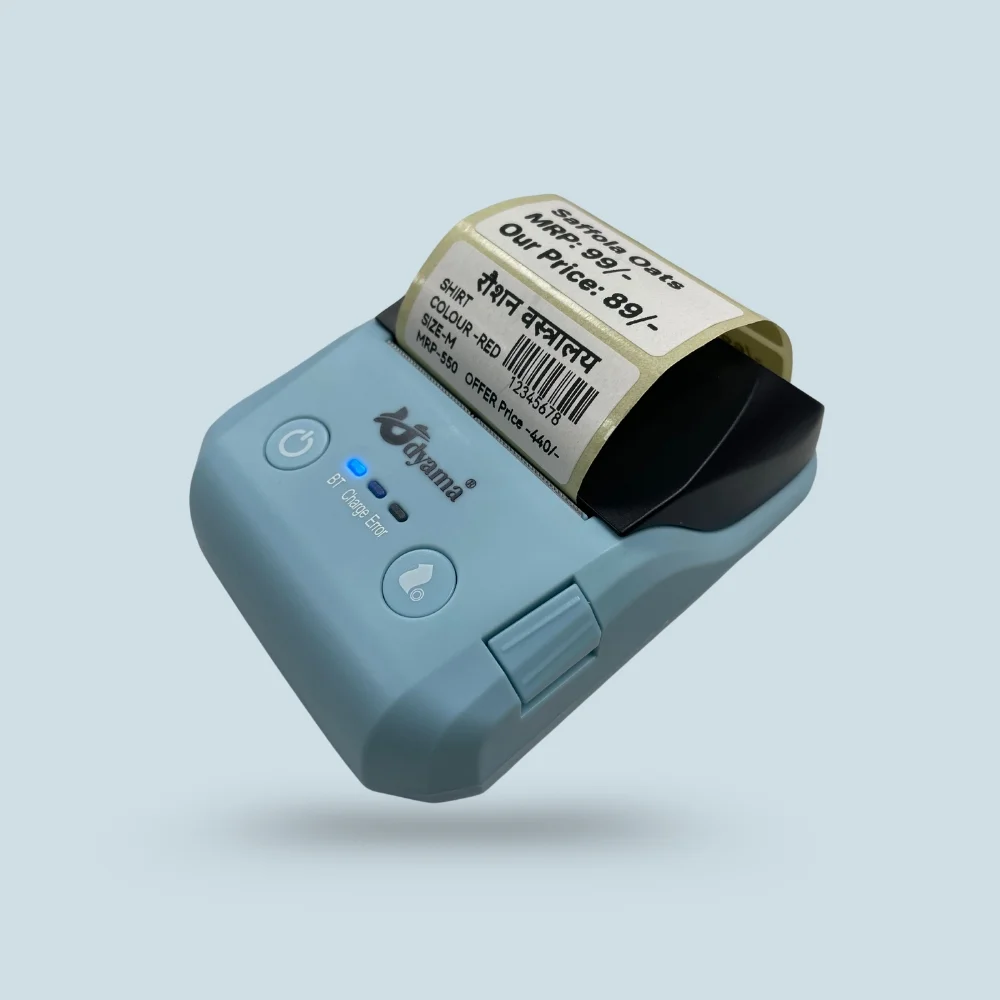
Businesses today need fast, reliable, and cost-effective printing solutions to manage everyday transactions. From retail shops and restaurants to delivery services and warehouses, printing bills, receipts, and product labels is an important part of daily operations. A compact printer can make these tasks easier while saving valuable counter space.
A mini thermal printer is a practical choice for businesses that need quick printing without the hassle of ink cartridges. With portable designs and convenient connectivity options available in selected models, these printers are suitable for both fixed workstations and mobile business operations.
What Is a Mini Thermal Printer?
A mini thermal printer is a compact printing device that uses heat to print text, numbers, barcodes, and other supported content on compatible thermal paper or labels. Unlike traditional inkjet printers, direct thermal printers generally do not require ink cartridges or toner.
Their compact size makes them useful for businesses with limited workspace or employees who need to print documents while moving between locations.
Depending on the model, a mini printer can be used for:
- Printing customer receipts and bills
- Generating small product labels
- Printing barcodes and QR codes
- Preparing order slips for restaurants
- Supporting mobile billing operations
Before purchasing, businesses should check the printer’s supported paper type, printing width, connectivity, and compatibility with their billing software.
Benefits of Using a Portable Thermal Printer
A portable thermal printer offers flexibility for businesses that cannot always depend on a traditional desktop printing setup. Its lightweight design and compact size make it convenient to carry between counters, delivery locations, warehouses, and temporary sales points.
1. Easy to Carry and Operate
Portable printers are designed to fit into small workspaces and mobile setups. Delivery professionals, field sales representatives, and service providers can benefit from having printing facilities available when required.
2. Lower Printing Maintenance
Direct thermal printing does not require ink or toner. This can simplify routine maintenance and reduce the need to purchase traditional printing consumables. Businesses still need to replace thermal paper rolls and maintain the printer according to the manufacturer’s instructions.
3. Convenient Connectivity
Depending on the model, a portable printer may support USB, Bluetooth, or other connection options. Wireless connectivity can make it easier to print from compatible smartphones, tablets, and other devices.
Before choosing a printer, confirm that its connection method works with your existing POS system and operating software.
4. Suitable for Different Business Environments
Portable thermal printers can support several applications, including retail billing, takeaway orders, delivery receipts, parking operations, and field services. Their usefulness depends on the printing format and features required by the business.
Why Choose a Thermal Barcode Printer?
Accurate product identification is essential for businesses that manage multiple products, stock levels, or customer orders. A thermal barcode printer helps businesses produce readable barcode labels that can be scanned by compatible barcode scanners.
Barcode printing can simplify inventory management, product identification, and order processing when integrated with an appropriate billing or inventory system.
Key Applications of Thermal Barcode Printers
Retail stores: Retailers can use barcode labels to identify products, organise stock, and support faster checkout processes.
Warehouses: Barcode labels help employees identify packages, track stock, and organise storage locations.
E-commerce businesses: Shipping and inventory labels can help streamline order preparation and dispatch.
Manufacturing units: Product identification labels can support tracking and organisation throughout different stages of production.
When selecting a barcode printer, check its resolution, supported barcode formats, printing speed, label dimensions, and software compatibility. Not every mini printer supports the same label sizes or barcode functions, so it is important to choose a model according to your actual requirements.
How a Small Thermal Printer Helps Small Businesses
A small thermal printer can be especially useful for startups and small businesses that need a simple printing setup without investing in bulky equipment.
For example, a small grocery shop may need a printer for daily receipts, while a food outlet may use one to print order slips. A mobile service provider may prefer a compact model that can be carried easily from one customer location to another.
Here are some practical advantages for small businesses:
- Space-saving design: Fits comfortably into compact workstations.
- Quick printing: Helps employees complete routine printing tasks efficiently.
- Simple operation: Many models offer straightforward paper loading and easy setup.
- Flexible usage: Selected models support different devices and business applications.
- Reduced consumable requirements: Direct thermal models work without ink or toner.
Choosing the right printer can help businesses maintain an organised billing process and provide a smoother customer experience.
Important Factors to Consider Before Buying a Thermal Printer
Not every thermal printer is suitable for every business. Before making a purchase, compare the features that matter most to your daily operations.
Printing Purpose
First, decide whether you need a printer for receipts, barcode labels, shipping labels, or order slips. Receipt printers and label printers may support different paper formats, so confirm the intended use before selecting a model.
Printing Speed and Resolution
Printing speed affects how quickly a printer can handle routine jobs, especially during busy hours. Resolution is also important when printing small text or barcodes that need to remain clear and readable.
Connectivity Options
Check whether you require USB, Bluetooth, or another supported interface. Ensure that the printer is compatible with your smartphone, computer, POS billing machine, or existing business software.
Paper and Label Compatibility
Verify the supported paper width, roll size, label type, and maximum printing width. Selecting compatible supplies helps prevent printing problems and unnecessary material waste.
Battery and Portability
If you plan to print away from a fixed workstation, consider battery capacity, charging requirements, printer weight, and expected operating time. These specifications vary by model.
After-Sales Support
Reliable technical assistance can be important when a printer is used for everyday billing. Review the warranty, available support, driver availability, and maintenance requirements before purchasing.
Why Explore Thermal Printing Solutions from Udyama POS?
Udyama POS offers business printing and POS equipment designed for different operational needs, including thermal receipt printers and thermal label printers. Its product range includes options with features such as USB or Bluetooth connectivity, depending on the model.
Businesses can explore the available products to identify a suitable solution for their billing, receipt printing, and labelling requirements.
To choose the right printer, consider your daily print volume, the type of paper or labels you use, and the devices with which the printer must work. Comparing these details can help you select equipment that fits your workflow rather than paying for features you may not need.
